Cryptocurrency PowerPoint Template: A Modern Design Toolkit
More Than Just Slides: A Visual Identity for Your Blockchain Business
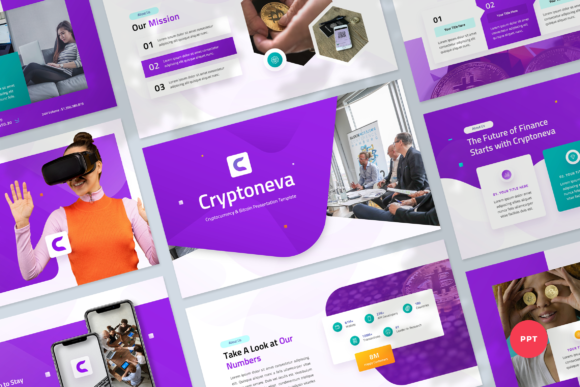
When you're preparing a pitch for potential investors or a lecture on decentralized finance, your presentation needs to do more than just list facts. It needs to build trust, project innovation, and hold attention. The Cryptocurrency PowerPoint Template, specifically the Cryptoneva Presentation Template, is built with this reality in mind. It’s not a generic slide deck with a Bitcoin logo slapped on. It’s a cohesive design system with 42 slides that share a consistent visual language: clean lines, a modern color palette often featuring blues, teals, and sleek grays, and a layout that prioritizes clear data visualization. The personality here is professional, tech-forward, and confident. It avoids the garish, overly "crypto-bro" aesthetic in favor of something more sophisticated, making it suitable for serious financial discussions and corporate blockchain applications.
The overall appeal lies in its balanced approach. The design feels both contemporary and timeless, steering clear of fleeting trends that might date your presentation next year. It uses ample white space, which is crucial for readability and gives your content room to breathe. The graphics are resizable and customizable, meaning the icons and charts aren't just decorative—they're functional elements you can adapt to your specific data. This template understands that in the crypto world, clarity is currency. Whether you're explaining a complex smart contract or showcasing exchange platform metrics, the visual hierarchy is already established for you, guiding your audience's eye to the most important information.
Practical Applications: Where This Template Shines
Think of this Cryptocurrency PowerPoint Template as a versatile design asset for your brand identity toolkit. Its strength is in its specificity married with adaptability. For a crypto startup seeking venture capital, the template provides the professional polish needed to be taken seriously. The slide layouts for financial data, roadmaps, and team bios are structured to tell a compelling story of growth and expertise. For a marketing agency pitching blockchain services to a client, it demonstrates an understanding of the industry's aesthetic, instantly building credibility. Educators and bloggers in the space will find the diagram and process slides invaluable for breaking down intricate topics like tokenomics or consensus mechanisms into digestible visuals.
Beyond the obvious pitch decks, consider its use for internal communications. A quarterly update for stakeholders, a technical workshop for developers, or a compliance training module all benefit from a unified, professional look. The consistency across all 42 slides ensures that every document from your organization feels part of the same family, reinforcing brand recognition and professionalism. The drag-and-drop picture placeholders make it efficient to incorporate your own product screenshots or team photos, maintaining a personal touch within the polished framework. This isn't just a presentation; it's a tool for maintaining visual consistency across all your business communications.
Making It Work for You: Guidance and Best Practices
Acquiring the template is the first step; using it effectively is the next. Start by evaluating your project's specific needs. Scan through all 42 slides to understand the full range of layouts available—don't just use the first five. The included documentation file is there for a reason; a quick review can save you hours of guessing. When customizing, leverage the master slides. Editing colors, fonts, and logos at the master level ensures global changes propagate throughout the entire deck, guaranteeing consistency and saving you from tedious, slide-by-slide adjustments.
Typography, even within a pre-designed template, warrants attention. The template recommends free web fonts, which is a huge plus for accessibility and licensing. Before you finalize, test these font pairings with your actual content. Does the body text remain readable when you fill a text-heavy slide? Does the hierarchy between headings and subpoints stay clear? The 16:9 widescreen ratio is perfect for modern displays, but always preview your final presentation on the actual screen or projector you'll use to check for any scaling quirks. Remember, all images in the demo are for preview only. Source your own high-quality, relevant imagery—perhaps from a reputable stock site or your own screenshots—to make the presentation truly yours. The goal is to use this premium font and graphic system as a scaffold to build your unique message upon, not as a finished product to fill in blindly.
Ultimately, a great Cryptocurrency PowerPoint Template like this one does the heavy lifting of design so you can focus on your message. It provides the modern typography, the structured visual hierarchy, and the professional polish that signals competence to your audience. By understanding its features and applying it thoughtfully, you transform it from a simple download into a powerful component of your brand's communication strategy, ensuring your next presentation is not only informative but also visually compelling and strategically aligned with your goals in the dynamic world of digital assets.